Copilot Studio, Power Automate, Dataverse, Teams, Model-Driven App

Copilot Studio
Automate
Dataverse
Teams
Azure OpenAI
Entra ID
Power Apps
RBAC
Manual IT support intake often breaks down at the point of ownership. When users type their own identifying details, status checks and escalations become harder to trust, and support teams have weaker audit trails.
The challenge was to design a helpdesk experience that stayed simple for the user while enforcing identity, authorization, and operational control behind the scenes.
I built an authenticated Copilot Studio agent backed by Power Automate and Dataverse.
Escalation alerts are handled by a watcher flow rather than directly inside the user-triggered flow, helping prevent duplicate notifications and improving operational reliability.
Escalation alerts are handled by a watcher flow to prevent duplicate notifications and avoid user-context issues.
The solution separates conversational intake from governed workflow execution. Copilot Studio handles the user interaction, Power Automate manages orchestration and validation, Dataverse acts as the system of record, and a model-driven app provides technician visibility.
A watcher flow listens for escalated tickets and sends a single notification, giving the design both operational control and clean auditability.
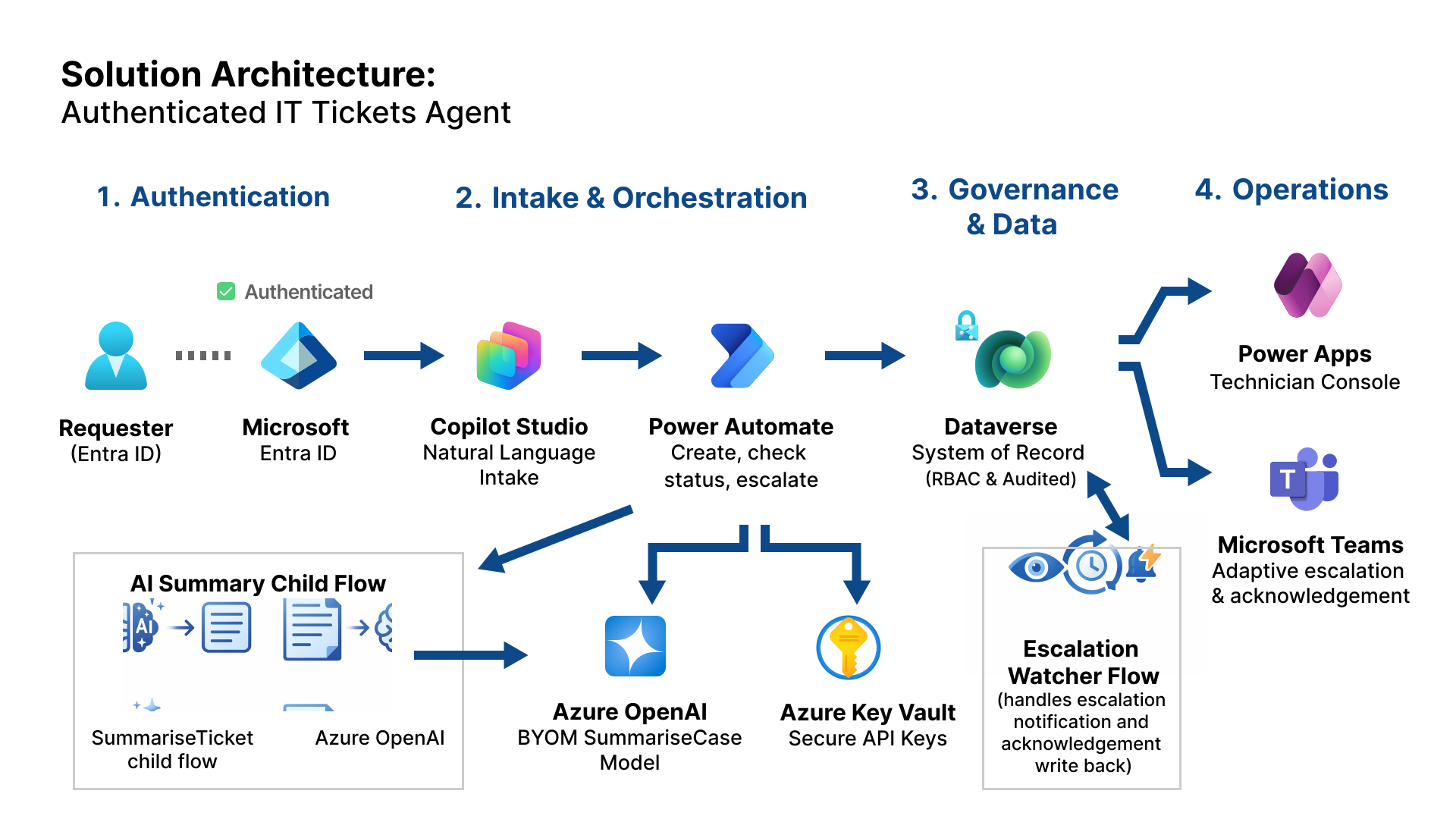
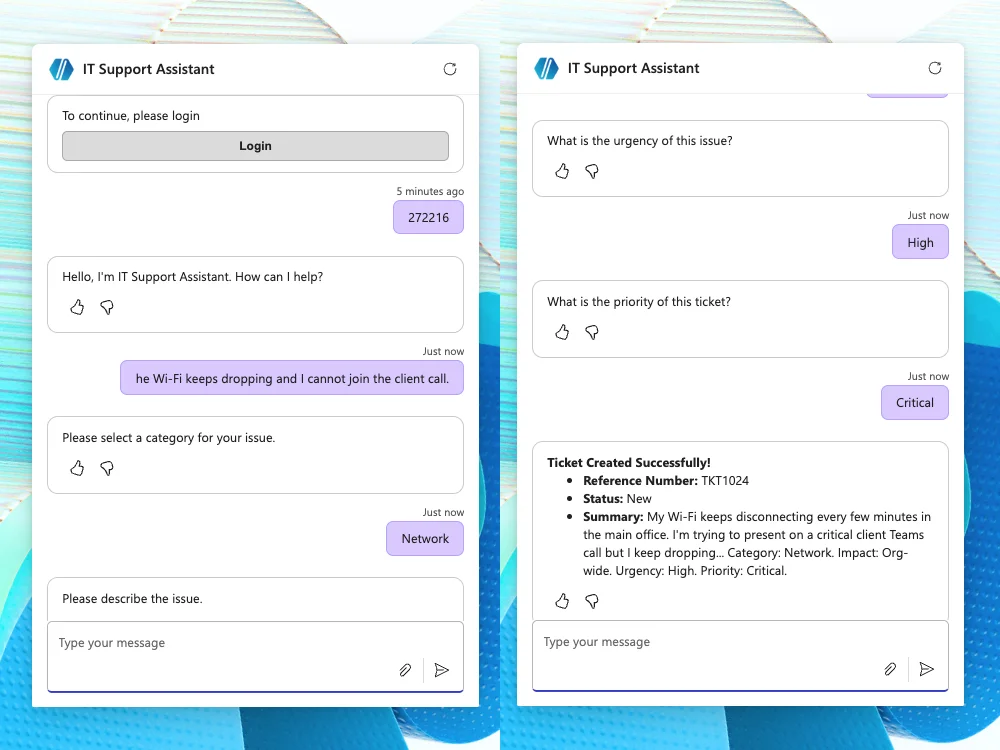
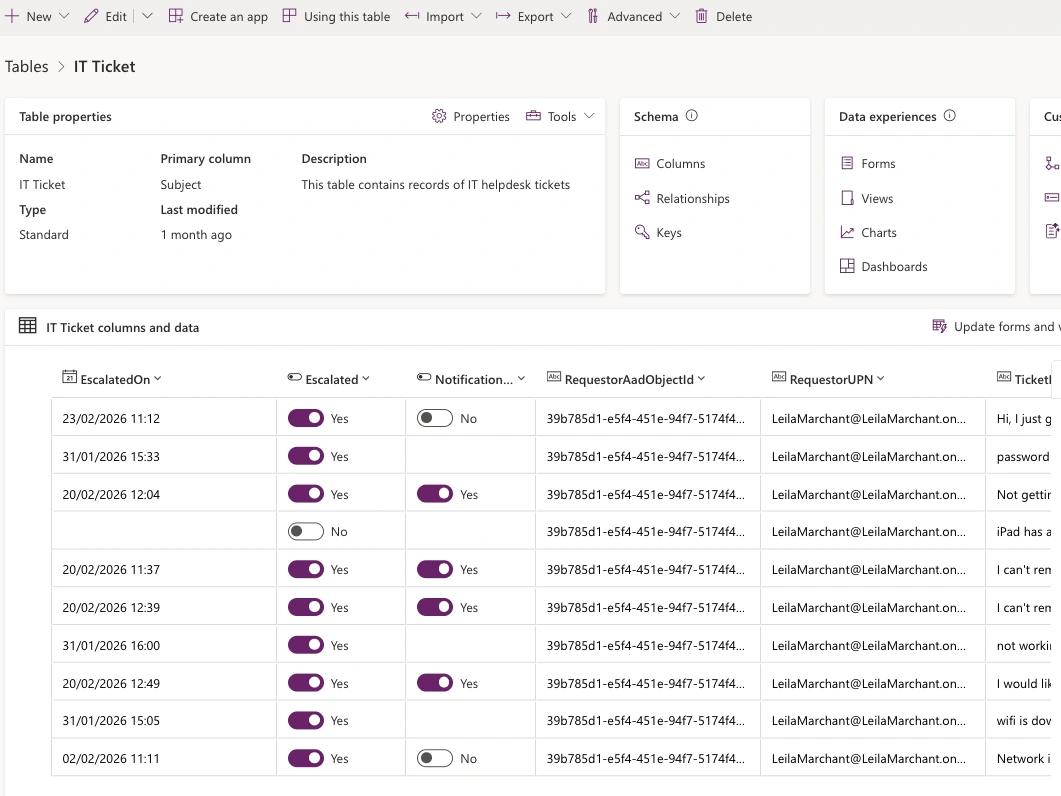
These screens show the key workflow decisions behind the build: authenticated intake, identity-based authorization, escalation guardrails, and technician-facing operational visibility.
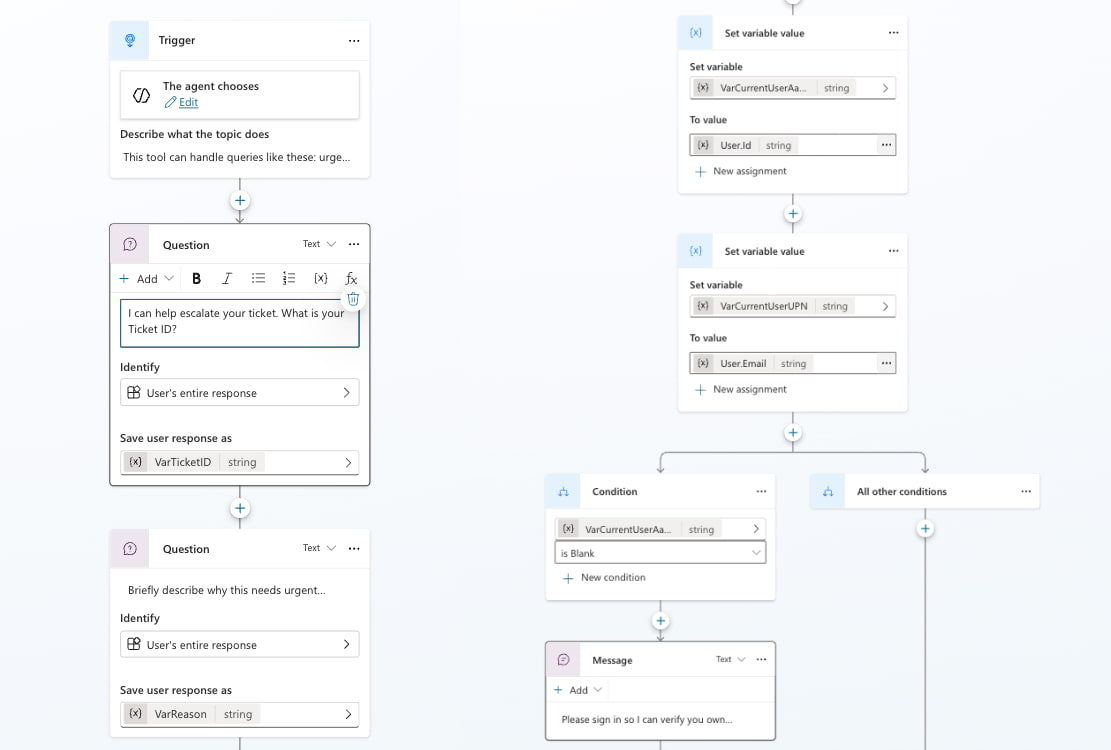
The conversation flow removes typed email prompts and uses signed-in system identity instead. That shift makes ticket ownership and authorisation more reliable from the start.
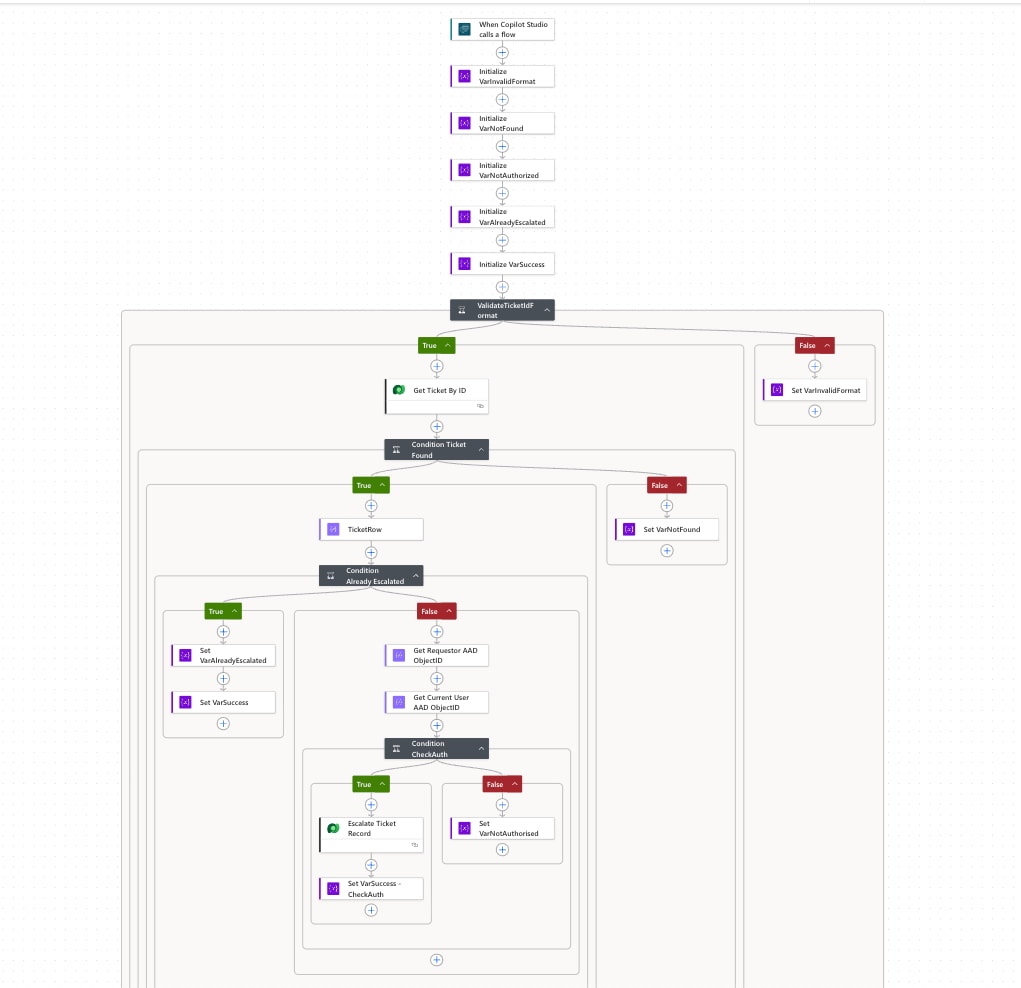
The escalation flow validates ticket format, checks ticket ownership against the signed-in user’s AAD object ID, blocks repeat escalation through an idempotency branch, and updates the ticket only when all checks pass.
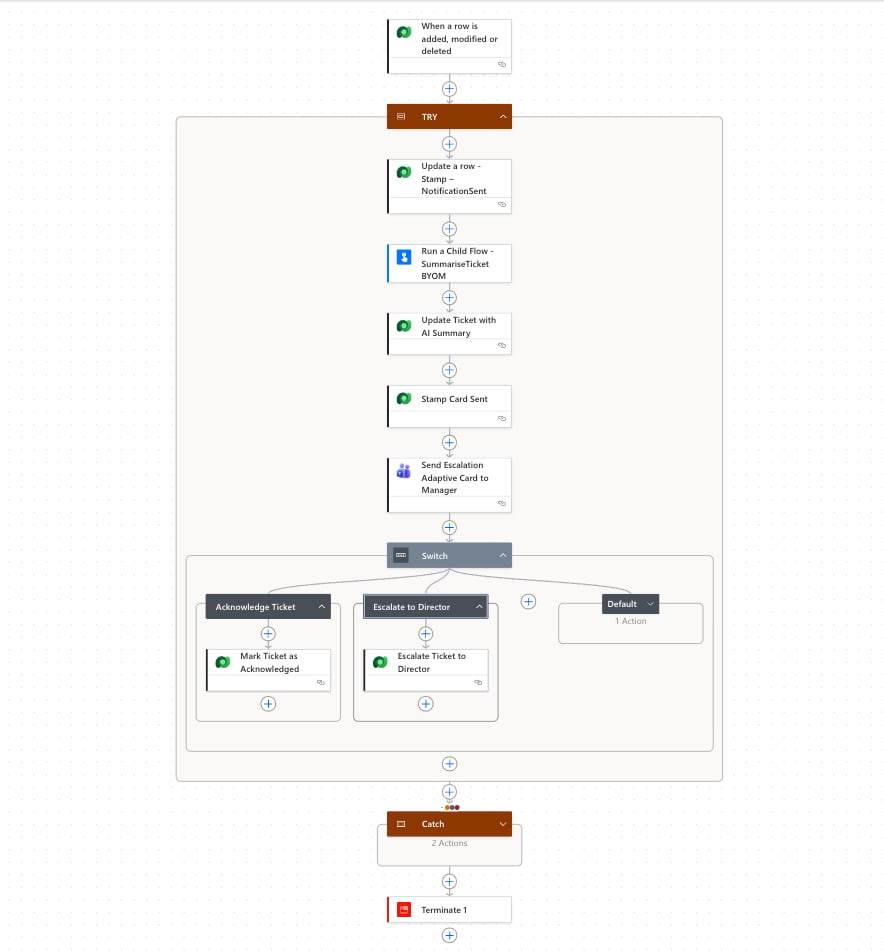
Notifications are handled by a Dataverse-triggered watcher rather than directly in the user-triggered flow. This avoids duplicate alerts, improves reliability, and creates a cleaner audit trail.
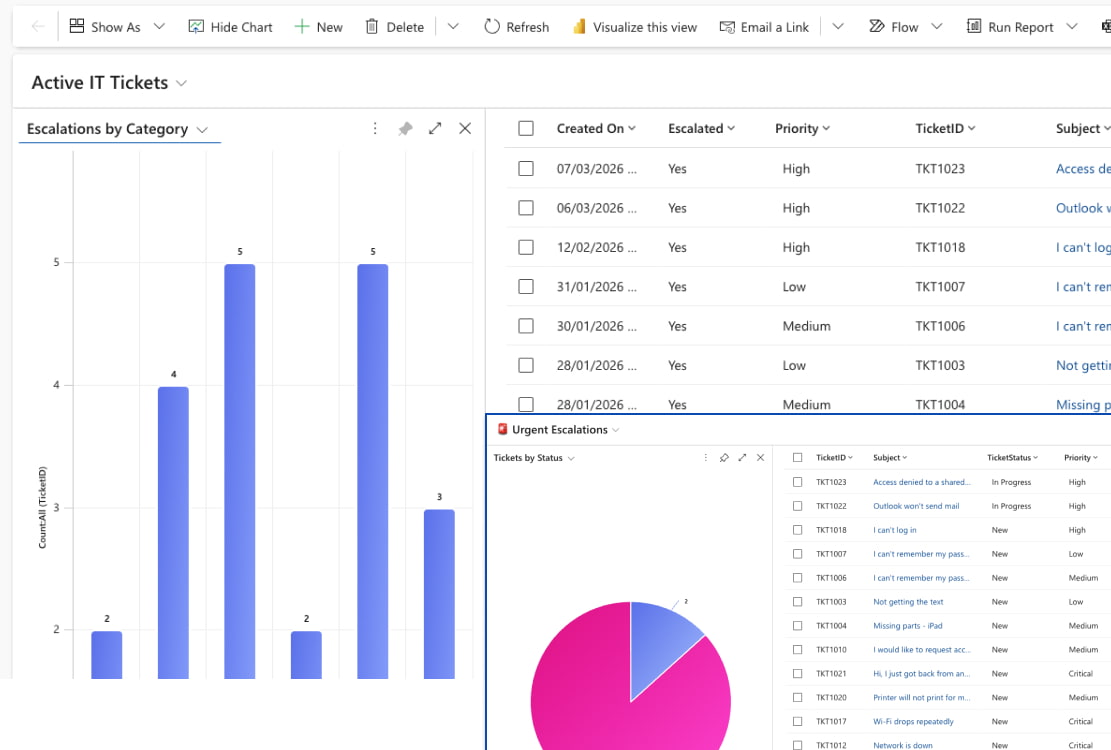
Escalated tickets are surfaced in a model-driven app view designed for support operations, giving technicians a clear queue of urgent work with the right ticket context.
A key design decision in this build was shifting from convenience-based identity to trusted authenticated identity. Instead of relying on user-typed email addresses, the solution captures signed-in system identity, stores trusted requester fields in Dataverse, and uses those values to authorise ticket status and escalation actions securely.
For escalation, the workflow validates the ticket reference, confirms ownership, checks whether the ticket has already been escalated, and updates the record only when those checks pass. Notification handling is controlled separately to reduce the risk of duplicate operational alerts. The result is a solution that stays simple for the user while demonstrating the governance, reliability, and lifecycle control expected in an enterprise support process.
Authenticated ticket logging through Copilot Studio
Dataverse-backed ticket lifecycle and status tracking
Identity-based ticket status retrieval
Guided urgent escalation flow
Adaptive card support for clear status presentation
Technician console for escalated ticket visibility
Entra sign-in enforced at the agent level
Trusted identity fields stored against the ticket record
Authorization checks based on requestor AAD object ID
Idempotency branch to prevent duplicate escalation alerts
Escalation audit fields including who and when
RBAC and least-privilege design for support operations
This build was designed to show more than chatbot interaction. It demonstrates how conversational AI can be connected to governed business process design inside the Microsoft ecosystem.
Structured topics for ticket logging, status checks, and escalation.
Helper flows, watcher automation, branching, and lifecycle control.
Trusted identity fields, audit fields, escalation state, and lifecycle data.
Ownership checks tied to the signed-in user rather than free-text input.
A model-driven technician console for support team visibility.
Idempotency, least privilege, notification control, and auditability.
This project reinforced that the real value of an AI support assistant is not just in the conversation layer, but in the governed process behind it. Replacing typed identity with trusted authenticated identity immediately improved ownership, authorisation, and escalation safety.Separating user actions from watcher-based notification handling also made the solution more reliable and more suitable for enterprise-style support operations.
The current build proves the core authenticated workflow. The next phase extends it toward richer operational governance, manager interaction, and AI-assisted summarisation.
Upgrade the watcher to send Adaptive Cards with acknowledgement and escalation actions, then write responses back to Dataverse for a stronger operational loop.
Add an SLA timer, reminder tracking, and director escalation fields so overdue tickets can be chased and escalated with a clearer decision trail.
Generate a concise ticket summary through a reusable BYOM child flow, with prompt configuration stored in environment variables for safer change control.